
Track affiliate conversions in mobile apps with Komissio's Flutter SDK
How to track affiliate-driven conversions inside your iOS and Android apps using the Komissio Flutter SDK — deep link attribution, offline queuing, and automatic commission calculation included.
Contents
Track Affiliate Conversions In Mobile Apps With Komissio's Flutter SDK
Most affiliate programs stop at the browser. A visitor clicks an affiliate link, lands on your website, and converts — your tracking pixel fires, the commission is recorded, everyone is happy. But what happens when that same visitor downloads your app and makes their first purchase there instead? The affiliate who drove that install gets nothing. The conversion falls into a black hole.
This is not a niche problem. Mobile commerce now accounts for over 60% of all e-commerce transactions globally, and app-based conversions are growing 2.5x faster than mobile web. If your affiliate program cannot track conversions inside your app, you are systematically underpaying the affiliates who drive your most valuable customers — and they will notice.
Komissio's new Flutter SDK (komissio_sdk on pub.dev) solves this. One package, both platforms, with deep link attribution, offline queuing, idempotent retries, and automatic commission calculation built in.
What Is A Mobile Affiliate Tracking SDK?
A mobile affiliate tracking SDK is a software library that you integrate into your native or cross-platform mobile application to attribute in-app conversions — purchases, subscriptions, signups, or custom events — back to the affiliate who originally referred the user. The SDK handles the full attribution chain: capturing the affiliate's referral data when the app opens (typically via a deep link or deferred deep link), persisting that attribution through the user's session, and reporting conversion events to the affiliate platform's server-side API when a qualifying action occurs.
Unlike browser-based affiliate tracking that relies on cookies or pixels, a mobile affiliate tracking SDK uses device-level identifiers and deep link parameters to maintain attribution across app installs, background/foreground cycles, and even offline periods. This makes mobile SDK tracking more durable than cookie-based approaches, which break when users switch from browser to app or when privacy features clear tracking data.
Why Browser-Based Affiliate Tracking Fails On Mobile
If you are running an affiliate program today without mobile SDK tracking, here is what is happening to your conversion data — and your affiliate relationships.
The App Install Gap
A user clicks an affiliate link on their phone, lands on your mobile website, and decides to download your app from the App Store or Google Play. They open the app two minutes later and complete a purchase. Your web-based tracking pixel never fires because the conversion happened in the app, not the browser. The affiliate gets no credit. You just lost attribution on a paying customer.
This is not an edge case. For apps with both a web and mobile presence, 30-40% of affiliate-referred users convert in-app rather than on the mobile web. Every one of those conversions is invisible to browser-based tracking.
Cookie Expiration And Privacy Restrictions
Mobile Safari's Intelligent Tracking Prevention deletes most tracking cookies after 7 days (or 24 hours for JavaScript-set cookies). Firefox and Chrome on Android have similar restrictions. If an affiliate drives a click on Monday and the user installs your app and converts the following weekend, the attribution cookie is already gone.
Session Fragmentation
Mobile users do not behave like desktop users. They click a link during their commute, browse your site during lunch, download the app at home, and finally purchase three days later while watching TV. Browser tracking cannot stitch this journey together. An SDK that captures attribution at the deep link level and persists it locally on the device can.
How The Komissio Flutter SDK Works
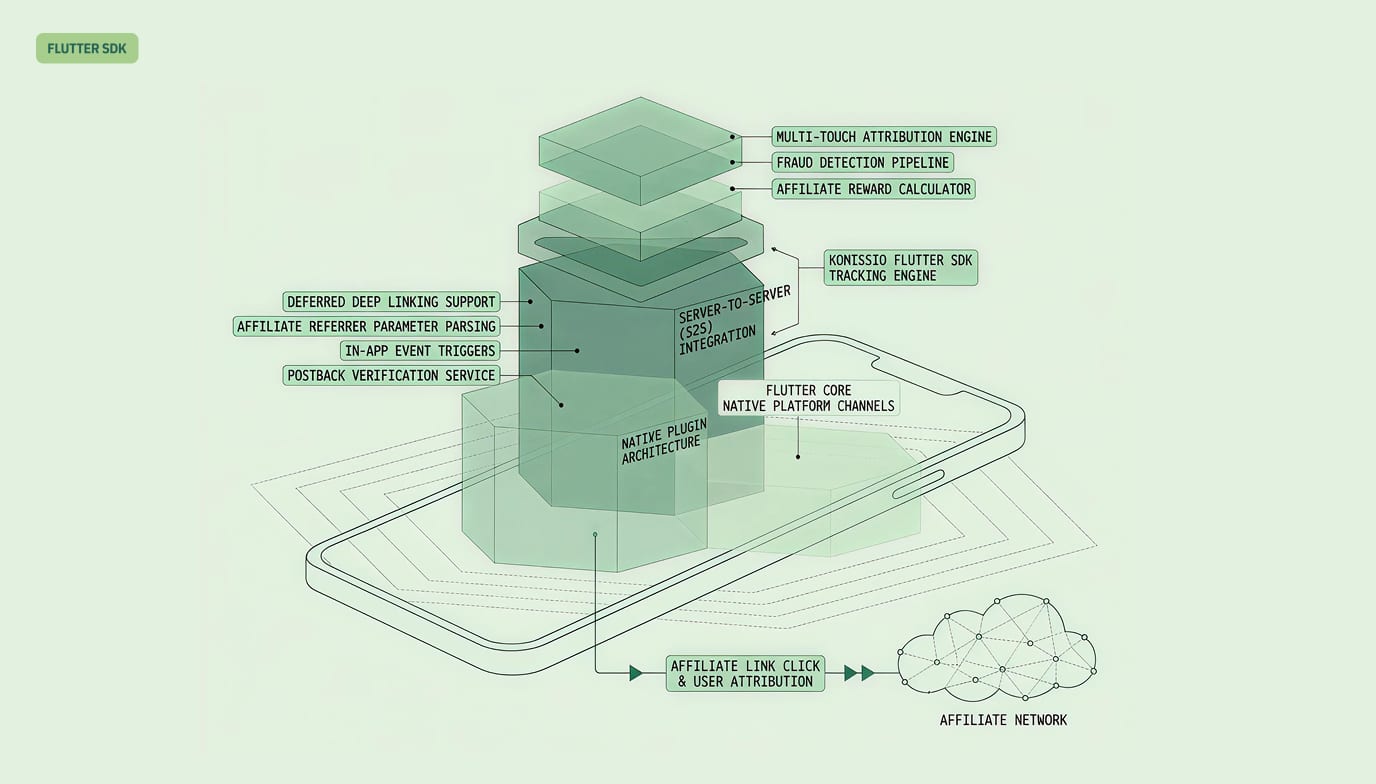
The SDK is designed around three principles: capture attribution early, persist it locally, and report conversions reliably — even when network conditions are poor.
Architecture Overview
Here is how a typical mobile affiliate conversion flows through the system:
Affiliate shares a deep link — built using Komissio's link stealth system, which generates links that look like normal URLs, not affiliate links
User taps the link — the OS routes them to your app (or to the app store, then your app on first launch)
SDK captures attribution — on app open, the SDK extracts the affiliate ID, campaign ID, and click ID from the deep link URI
User completes a qualifying action — in-app purchase, subscription start, signup, or any custom event you define
SDK reports the conversion — sends the event to Komissio's server-side API with the stored attribution data
Backend calculates the commission — Komissio applies your commission rules (flat, percentage, or tiered) automatically and credits the affiliate in real time
Deep Link Attribution
The SDK captures affiliate attribution data from deep links using the standard uni_links pattern in Flutter. When your app opens via a deep link, you pass the URI to the SDK and it extracts and persists the attribution parameters.
import 'package:komissio_sdk/komissio_sdk.dart';

// Initialize the SDK once at app startup
await Komissio.configure(
  apiKey: 'km_live_your_api_key_here',
  merchantId: 'your-merchant-uuid',
  appVersion: '1.2.3',
);

// When the app opens via a deep link, capture the attribution
void onDeepLink(Uri uri) {
  Komissio.handleDeepLink(uri);
  // The SDK extracts ref, cmp, coupon, and promo params
  // and persists them to local storage automatically
}
Attribution data survives app restarts, background kills, and device reboots because the SDK writes it to persistent local storage — not just in-memory state.
Tracking Conversions
Once attribution is captured, you report conversions wherever they happen in your app. The SDK attaches the stored attribution data automatically.
// Track a purchase conversion
final result = await Komissio.trackConversion(
  eventType: EventType.oneTimePurchase,
  customerIdentifier: '[email protected]',
  value: 49.99,
  orderId: 'order_abc123', // used for idempotency
  metadata: {
    'plan': 'pro_monthly',
    'source': 'in_app_upgrade',
  },
);

// Track a subscription start
await Komissio.trackConversion(
  eventType: EventType.subscriptionCreated,
  customerIdentifier: '[email protected]',
  value: 99.00,
  orderId: 'sub_xyz789',
  metadata: {
    'plan': 'annual',
    'billing': 'monthly',
  },
);

// Track a custom event (e.g., free trial signup)
await Komissio.trackConversion(
  eventType: EventType.trackingVisit,
  customerIdentifier: '[email protected]',
  orderId: 'trial_def456',
);
Every conversion call includes the orderId parameter, which the backend uses for idempotency. If the same orderId is sent twice — because of a network retry, a duplicated event, or a race condition — the second request is discarded. No duplicate commissions, no manual cleanup.
Offline Queue And Retry Logic
Mobile apps do not always have a stable network connection. The SDK handles this with a local queue.
// The SDK handles this automatically, but here is what happens:
// 1. User completes a purchase while on the subway (no network)
// 2. SDK queues the conversion event locally with full attribution data
// 3. When network connectivity returns, SDK drains the queue
// 4. Failed requests are retried with exponential backoff (3 attempts)
// 5. If all retries fail, the event stays in the queue for the next cycle
You do not need to write any retry logic yourself. The SDK monitors network state and processes queued events automatically when connectivity is restored. Events in the queue include a timestamp, so the backend records the actual conversion time — not the time the event was eventually delivered.
Full Integration Example
Here is a complete integration for a typical e-commerce app:
import 'package:flutter/material.dart';
import 'package:komissio_sdk/komissio_sdk.dart';
import 'package:uni_links/uni_links.dart';
import 'dart:async';

void main() async {
  WidgetsFlutterBinding.ensureInitialized();

  // Step 1: Initialize the SDK
  await Komissio.configure(
    apiKey: 'km_live_your_api_key_here',
    merchantId: 'your-merchant-uuid',
    appVersion: '1.0.0',
  );

  runApp(const MyApp());
}

class MyApp extends StatefulWidget {
  const MyApp({super.key});
  @override
  State<MyApp> createState() => _MyAppState();
}

class _MyAppState extends State<MyApp> {
  StreamSubscription? _linkSub;

  @override
  void initState() {
    super.initState();
    _initDeepLinks();
  }

  Future<void> _initDeepLinks() async {
    // Step 2: Handle deep link that launched the app
    final initialUri = await getInitialUri();
    if (initialUri != null) {
      Komissio.handleDeepLink(initialUri);
    }

    // Handle deep links while app is running
    _linkSub = uriLinkStream.listen((Uri? uri) {
      if (uri != null) {
        Komissio.handleDeepLink(uri);
      }
    });
  }

  // Step 3: Track when the user completes a purchase
  Future<void> onPurchaseComplete(String orderId, double amount) async {
    final result = await Komissio.trackConversion(
      eventType: EventType.oneTimePurchase,
      customerIdentifier: '[email protected]',
      value: amount,
      orderId: orderId,
    );

    if (result.attributed) {
      print('Commission: ${result.commission?.amount}');
    }
  }

  @override
  void dispose() {
    _linkSub?.cancel();
    Komissio.dispose();
    super.dispose();
  }

  @override
  Widget build(BuildContext context) {
    return MaterialApp(
      // your app here
    );
  }
}
Server-Side Processing: What Happens After The SDK Reports
When the SDK sends a conversion event, Komissio's backend handles everything from validation to commission payout. Here is the sequence:
Idempotency check — the server checks whether this
orderIdhas already been processed. Duplicates are rejected with a 200 response (so the SDK removes them from its queue).Attribution validation — the server verifies the affiliate ID, campaign ID, and click ID are valid and active.
Commission calculation — based on your configured commission rules, the server calculates the affiliate's earning. Flat rate, percentage of the conversion amount, or tiered — whatever rules you have set in your Komissio dashboard apply automatically.
Commission creation — the commission record is created with status
pending, linked to the affiliate, campaign, and merchant.Real-time notification — the affiliate sees the new commission in their dashboard instantly via Komissio's real-time tracking (Socket.IO). No polling, no waiting for a batch job.
Clawback window — the commission enters the configurable holding period (typically 30-60 days). After the window passes without a refund or chargeback, the commission is approved and queued for the next payout.
The affiliate does not need to do anything differently. Conversions from the mobile SDK appear in their dashboard alongside web conversions — same commission rules, same payout schedule, same audit trail.
Setting Up Deep Links For Your App
For the SDK to capture attribution, your app needs to handle deep links. Here is the setup for both platforms.
iOS (Universal Links)
Add your Komissio tracking domain (or custom tracking domain) to your app's Associated Domains:
In Xcode, go to your target's Signing & Capabilities tab
Add Associated Domains capability
Add
applinks:partners.yourdomain.com(your custom tracking domain)Host an
apple-app-site-associationfile at your tracking domain's root
Android (App Links)
Add an intent filter to your AndroidManifest.xml:
<intent-filter android:autoVerify="true">
  <action android:name="android.intent.action.VIEW" />
  <category android:name="android.intent.category.DEFAULT" />
  <category android:name="android.intent.category.BROWSABLE" />
  <data
    android:scheme="https"
    android:host="partners.yourdomain.com"
    android:pathPrefix="/t/" />
</intent-filter>
Both setups work with Komissio's custom tracking domains feature, so your deep links use your own domain — not a third-party tracking domain that users might distrust or ad blockers might flag.
When To Use SDK Tracking Vs. Server-Side Postback
The mobile SDK is not the only way to track app conversions. Here is when to use each approach.
In-app purchases (user-initiated) — Use SDK: Yes. Server-Side Postback: Also viable.
Subscription renewals (system-initiated) — Use SDK: No. Server-Side Postback: Yes.
Free trial signups — Use SDK: Yes. Server-Side Postback: Also viable.
Refunds and chargebacks — Use SDK: No. Server-Side Postback: Yes (via Stripe webhooks).
Offline/poor connectivity — Use SDK: Yes (queued). Server-Side Postback: No (requires server call).
Cross-platform (web + app) — Use SDK for app, pixel for web. Server-Side Postback: Single integration point.
The recommended approach: Use the SDK for user-initiated in-app events (purchases, signups, upgrades) and server-side postback for system-initiated events (subscription renewals, refunds, chargebacks). This gives you complete coverage without blind spots.
Key Takeaways
Mobile conversions are invisible to browser tracking. If your app drives any meaningful share of revenue, you need SDK-based attribution to credit affiliates accurately.
Deep link attribution is more durable than cookies. Device-level persistence survives app restarts, privacy restrictions, and the browser-to-app transition that breaks cookie tracking.
Offline queuing prevents lost conversions. Mobile users convert in subways, on airplanes, and in areas with poor connectivity. The SDK queues events locally and delivers them when the network returns.
Idempotency eliminates duplicate commissions. Every conversion includes an
orderIdthat the backend deduplicates automatically. No manual reconciliation needed.Commission rules apply uniformly. SDK conversions use the same flat, percentage, or tiered commission rules as your web conversions. Affiliates see all their earnings in one dashboard.
The integration is under 30 lines of code. Capture attribution on deep link open, report conversions when qualifying events happen. The SDK handles persistence, queuing, and retries.
Frequently Asked Questions
What Is A Mobile Affiliate Tracking SDK?
A mobile affiliate tracking SDK is a software library integrated into a mobile app that attributes in-app conversions — purchases, subscriptions, signups — back to the affiliate who referred the user. Unlike browser-based tracking that uses cookies and pixels, a mobile SDK captures attribution from deep links and persists it at the device level, maintaining accurate tracking across app installs, restarts, and offline periods. Komissio's SDK is built for Flutter, which means a single integration covers both iOS and Android apps.
How Does Deep Link Affiliate Attribution Work In Mobile Apps?
When a user taps an affiliate's link, the operating system routes them to your app (or to the app store first, then your app on launch). The SDK extracts the affiliate ID, campaign ID, and click ID from the deep link URI and stores them in persistent local storage on the device. When the user later completes a qualifying action — like a purchase or subscription — the SDK attaches that stored attribution data to the conversion event sent to the server. This approach survives app restarts, device reboots, and network interruptions.
Can I Track In-App Purchases For Affiliate Commissions?
Yes. The Komissio Flutter SDK tracks any in-app event you define, including one-time purchases, subscription starts, free trial conversions, and custom events. You call trackConversion() with the event type, amount, currency, and a unique order ID. The backend automatically calculates the affiliate's commission based on your configured rules — flat fee, percentage of sale, or tiered rates. Commissions from mobile conversions appear alongside web conversions in the affiliate's real-time dashboard.
What Happens If The User's Device Is Offline When A Conversion Occurs?
The SDK includes a built-in offline queue. When a conversion event fires without network connectivity, the SDK stores the event locally with its full attribution data and a timestamp. When the device reconnects, the SDK drains the queue automatically, sending each event to the server with exponential backoff retries (up to 3 attempts). The timestamp ensures the backend records the actual time of conversion, not the time of delivery. No conversions are lost due to poor connectivity.
Does The SDK Work With Custom Tracking Domains?
Yes. If you use Komissio's custom tracking domains feature (for example, partners.yourdomain.com), the SDK works with your branded domain for both deep link attribution and API calls. This means your affiliate links and conversion tracking use your own domain, which improves user trust and avoids ad blocker interference. You configure the baseUrl parameter when initializing the SDK to point to your custom domain.
How Do I Prevent Duplicate Commissions From Mobile SDK Events?
Every trackConversion() call requires an orderId parameter — typically your payment processor's transaction ID or your internal order identifier. The Komissio backend deduplicates events by this orderId. If the SDK sends the same conversion twice (due to a retry, network race condition, or app restart), the server accepts the first event and discards the duplicate. This idempotency guarantee means you never pay double commissions on the same transaction, with zero manual intervention.
Ready to track affiliate conversions in your mobile app? Install the komissio_sdk package from pub.dev, initialize it with your merchant credentials, and start attributing in-app conversions to your affiliates today. Your first conversion will appear in your real-time dashboard before you finish reading this sentence. Start your free trial — no credit card required.